How to Write Better ChatGPT Prompts: 2026 Guide + Tips
Master ChatGPT prompt writing with proven techniques and expert tips. Learn to create powerful prompts for ChatGPT, Claude & more. Includes 50+ examples.


Key Takeaways
- Most generic ChatGPT answers trace back to one missing ingredient in the prompt, and blending clarity with context is what turns a guessing machine into an assistant that understands your audience, tone, and goal on the first pass.
- Four core skills (clarity, structure, guided responses, and iteration) are what end the endless rewrite loop and get drafts 80% publish-ready, including why "make it engaging" fails and what to say instead.
- Role-based prompting, chain-of-thought reasoning, and iterative prompt flows give you sharper, deeper answers, with side-by-side tables of ready-to-adapt prompts for your next session.
- Context-aware prompts for SEO, client work, and creative projects, from meta descriptions under 155 characters to client follow-ups and brand origin stories, make ChatGPT feel like a teammate who knows your niche.
- Six common mistakes quietly sabotage your results, from vague instructions and information overload to "ask and hope" requests, and each one is paired with a bad and good prompt so you can spot and fix it instantly.
- Prompt-saving extensions, Discord and Reddit communities with thousands of active members, and certified programs from Vanderbilt, IBM, Google, and AWS keep sharpening your skills long after this guide.
If you have ever typed something into ChatGPT and thought, “That’s… not quite what I had in mind”, you are not alone. The difference between a vague, hit-or-miss answer and a spot-on, useful response often comes down to one thing: your prompt. In my years of working with writers, solopreneurs, and small agencies, I have seen that most people do not struggle with ChatGPT’s capabilities. They struggle with telling it exactly what they want in a way the AI can understand.
A well-crafted prompt is more than a question. It is a set of clear, specific instructions that guide ChatGPT toward producing the tone, style, and format you actually need. Whether you are a new writer experimenting with AI for the first time, a solo business owner trying to save hours on content, or a small agency aiming to keep client work consistent, learning how to write prompts for ChatGPT is now a core skill.
Think of this as your ChatGPT prompt writing guide filled with practical, real-world ChatGPT prompt writing tips I have tested myself. We will cover everything from the basics to the best writing style for ChatGPT prompts so you can stop getting generic answers and start getting responses that are as close to “ready to use” as possible.
Let us begin with the most important question: what exactly is a ChatGPT prompt, and why does it matter so much?
What Are ChatGPT Prompts and Why Do They Matter?
A ChatGPT prompt is simply the instruction you give the AI to tell it what you want. It can be a short question, a detailed set of steps, or even a creative roleplay scenario. But here is the catch: the quality of what you get back depends heavily on what you put in.
When your prompt is vague, you invite vague answers. If you are too brief, the AI has to guess your intent, which can lead to responses that feel generic or miss the mark completely. On the other hand, a prompt that is clear, specific, and well-structured can make ChatGPT behave more like an expert assistant who understands your exact needs.
This matters because most new writers, solopreneurs, and even small agencies do not have time to keep rewriting AI outputs until they sound right. A well-crafted prompt reduces that back-and-forth, which saves time, improves quality, and makes AI a more reliable part of your workflow. Learning how to write prompts for ChatGPT is not just a tech skill; it is a writing skill that pays off in faster turnaround, better alignment with your audience, and more professional results.
Think of this ChatGPT prompt writing guide as a shortcut to achieving consistent results. A good prompt should help you:
- Get answers that are tailored to your audience and purpose.
- Receive content in the tone and format you actually want.
- Reduce editing time by making the first draft closer to the final version.
- Use AI as a partner that supports, not replaces, your creativity.
In my experience, the best writing style for ChatGPT prompts is one that blends clarity with context. Give enough background so the AI understands your goal, but avoid overloading it with unnecessary details. This balance is what makes prompts repeatable, scalable, and easy to adapt across projects.
How Do I Write Effective ChatGPT Prompts?
The difference between a “meh” ChatGPT output and one that makes you nod in satisfaction often comes down to the prompt. Good prompts act like GPS instructions that are clear, specific, and hard to misunderstand. Poor ones are like telling a taxi driver, “Just take me somewhere nice.”
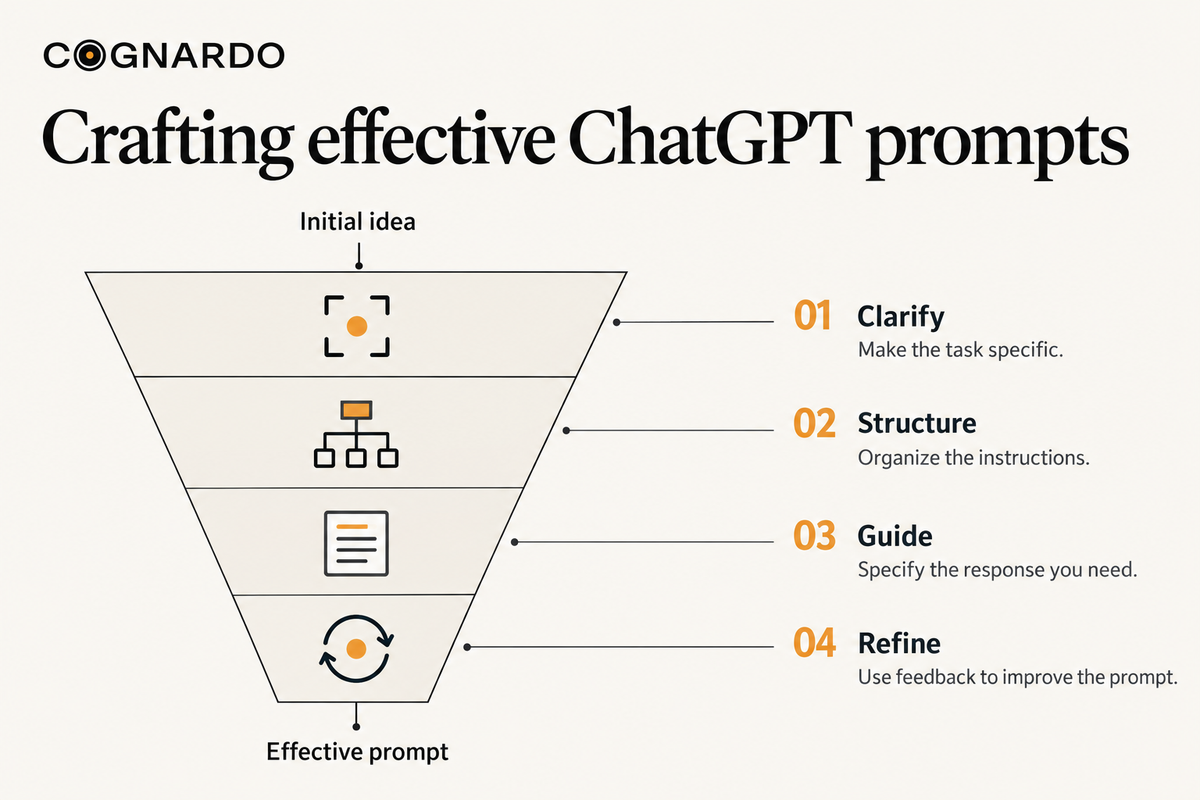
This section focuses on four core skills that will make your prompts more effective: clarity and specificity, clear structure, guided responses, and refinement through iteration.
Clarity and Specificity
Think of ChatGPT as a very smart assistant who is also a little too polite to interrupt you with clarifying questions. If you are vague, it will fill in the blanks, and you might not like how it does it.
Here’s what works:
- Define clear goals: Tell ChatGPT exactly what task you want it to perform. Instead of “Write about SEO,” say, “Summarize the top five beginner-friendly SEO tips for small business owners.”
- Use precise language: Replace broad phrases like “make it engaging” with specifics, such as “use short sentences, friendly tone, and examples from small business marketing.”
- Provide context: If your prompt is for a blog, tell ChatGPT the intended audience, purpose, and any background it should know. A prompt with context gets a response that feels tailored instead of generic.
When I first started working with AI, I would send short one-line prompts and spend more time fixing the output than I saved. Once I made clarity and context non-negotiable, my drafts started coming out 80% ready to publish.
Structure for Clarity
Even the best ideas can get lost in a messy request. ChatGPT works better when your instructions are organized and easy to follow.
Practical steps:
- Break complex tasks into smaller steps: Instead of asking for “a blog post about email marketing,” start with “Outline the main sections for a beginner’s guide to email marketing.” Then refine each section separately.
- Use formatting tools: Bullets, numbers, and headings make it easier for ChatGPT to process your request and give structured answers you can use right away.
- Specify output format: Tell it whether you want a list, table, paragraph, or multiple sections. If I ask for “three short paragraphs” instead of just “a summary,” I get a tighter and more usable response.
Clear structure doesn’t just help the AI; it makes reviewing the output faster and easier for you.
Guiding ChatGPT’s Response
The AI will happily mimic the voice and style you ask for, but only if you tell it what you want. This is where the best writing style for ChatGPT prompts comes in: be direct about tone, audience, and perspective.
Here’s how to shape the output:
- Assign roles: Start with “Act as a marketing strategist” or “Act as a social media copywriter for eco-friendly brands.”
- Audience specification: Make it clear who the content is for “small business owners with no marketing background” will get a different tone than “SEO specialists.”
- Tone and style: Formal, casual, witty, authoritative. Spell it out.
- Provide examples: Paste a short example of the style you like. This gives the AI a pattern to follow.
The more direction you give, the closer the output will match your voice and your reader’s expectations.
Iterate and Refine
Even with the perfect prompt, your first draft may not be perfect, and that is normal. The best results often come from a little back-and-forth.
Here’s the refinement process I teach in my ChatGPT prompt writing tips workshops:
- Review and analyze: Look at the output and note what is missing or overdone.
- Experiment with rephrasing: Small changes in wording can shift the tone or level of detail significantly.
- Provide continuous feedback: Tell ChatGPT exactly what to adjust. Instead of “Make it better,” try “Add two more real-world examples and keep paragraphs under four sentences.”
Think of it like working with a junior writer. You guide, they adjust, and together you get a better result each round.
What Are the Best Advanced ChatGPT Prompting Techniques?
Once you understand the basics of how to write prompts for ChatGPT, you can start using more advanced methods to get highly targeted and nuanced results. This ChatGPT prompt writing guide focuses on techniques that go beyond simple instructions, giving you more control over tone, structure, and depth.
The ChatGPT prompt writing tips here are based on real-world testing and will help you discover the best writing style for ChatGPT prompts in professional, creative, and technical contexts.
Role-Based and Persona Prompting
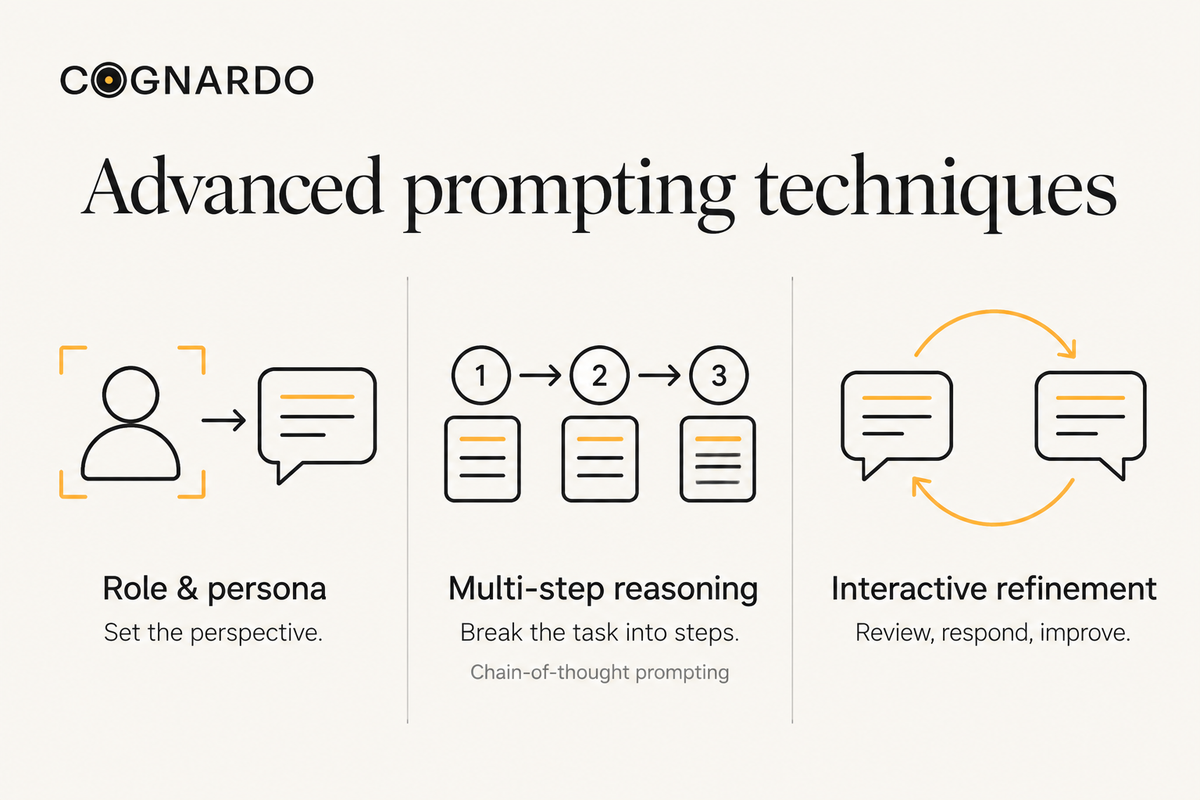
One of the quickest ways to improve how you write prompts for ChatGPT is to tell it exactly who it should be before generating an answer. This sets the tone, style, and depth of the response.
Why it works
- Gives ChatGPT a defined point of view
- Improves relevance by aligning with your audience
- Reduces generic or off-target output
How to use it
- Assign a clear role — Example: “Act as a marketing strategist.”
- Add audience details — Example: “Create tips for beginner fitness coaches.”
- Specify the outcome — Example: “Provide 5 Instagram content ideas.”
Sample role + audience prompts
Role | Audience | Example Prompt |
|---|---|---|
Marketing Strategist | Small business owners | Act as a marketing strategist and create a 3-month content plan for a small handmade jewelry brand |
SEO Consultant | Bloggers | Act as an SEO consultant and suggest keyword ideas for a travel blog targeting solo travelers |
Content Editor | Tech startups | Act as a content editor and rewrite this landing page for a SaaS startup to sound more persuasive |
Pro tip: The best writing style for ChatGPT prompts in this method is direct and specific. Avoid extra filler and clearly state the role, audience, and expected result in one sentence.
Chain-of-Thought and Multi-Step Reasoning
If you want ChatGPT to give you more accurate and logically sound answers, break the task into smaller, ordered steps. This method, often called “chain-of-thought prompting,” helps the AI reason through the problem instead of jumping straight to a final answer.
Why it works
- Improves clarity and accuracy
- Encourages logical flow instead of rushed answers
- Helps tackle complex or multi-part problems
How to use it
- Break the task into steps — Example: “First identify the main topics, then create headlines, then write summaries.”
- Number or bullet each step so ChatGPT processes them in order.
- Ask for reasoning — Example: “Explain your thought process before giving the final answer.”
Sample multi-step prompts
Goal | Steps in the Prompt | Example Prompt |
|---|---|---|
Write a blog outline | 1. List 5 main topics2. Suggest subheadings3. Provide intro and conclusion ideas | First list 5 main topics on sustainable living, then suggest subheadings, then provide an intro and conclusion idea |
Analyze data trends | 1. Summarize the data2. Identify patterns3. Recommend next actions | First summarize the Q2 sales data, then identify trends, then recommend actions to improve Q3 results |
Improve an email campaign | 1. Review current email2. Suggest improvements3. Rewrite with changes | Review this email for clarity, suggest 3 improvements, then rewrite it with those changes applied |
Pro tip: In your ChatGPT prompt writing guide, combine this method with role-based prompting for even better results. For example: “Act as a senior content strategist. First evaluate the current blog structure, then suggest improvements, then rewrite the intro.”
Interactive and Iterative Prompting
Not every prompt needs to deliver a perfect answer on the first try. Interactive and iterative prompting turns your ChatGPT session into a back-and-forth conversation where you refine the output step by step.
Why it works
- Allows continuous improvement of responses
- Adapts outputs based on your feedback
- Helps reach higher accuracy and relevance over multiple turns
How to use it
- Start broad — Ask ChatGPT for an initial draft or overview.
- Refine step by step — Give feedback on tone, detail, or structure.
- Add specifics — Include missing details or clarify points until the response matches your needs.
Sample interactive prompt flows:
Scenario | Step 1 Prompt | Step 2 Prompt | Step 3 Prompt |
|---|---|---|---|
Improve a blog intro | Write a 100-word blog intro on “digital marketing trends 2026” | Make it sound more conversational | Add a short hook sentence at the start |
Design a social media plan | Give me a 2-week Instagram content plan for a coffee shop | Add more focus on user-generated content | Include at least 3 ideas for Reels |
Rewrite a product description | Write a 50-word product description for a handmade leather wallet | Make it more persuasive | Add an eco-friendly angle |
Pro tip: The best writing style for ChatGPT prompts in this method is open-ended yet specific. Use action verbs (“refine,” “add,” “expand”) so ChatGPT knows it is working from a previous version rather than starting fresh.
How Do I Customize ChatGPT Prompts for Different Industries?
If you are figuring out how to write prompts for ChatGPT as a solopreneur, freelance writer, or part of a small agency, the real benefit comes when you tailor your prompts to the type of work you do. A generic request often gives generic results, but a context-aware prompt makes ChatGPT feel more like a teammate who understands your goals.
Content Creation & SEO Optimization
For many small agencies and solo writers, SEO-driven content is the bread and butter of client work. With the right prompts, ChatGPT can save hours while still delivering publish-ready drafts.
- Keyword integration: “Write a blog intro on sustainable fashion that naturally includes the keyword ‘eco-friendly fabrics’.”
- Meta descriptions: “Generate three meta description options for a blog about email marketing tips, each under 155 characters.”
- Content readability: “Simplify this 300-word blog section so it reads at a grade 8 level without losing key details.”
ChatGPT prompt writing tips: Always specify both the audience and the search intent. The best writing style for ChatGPT prompts in SEO is clear, concise, and direct about the format you need (meta, headline, or intro).
Business & Professional Applications
Solopreneurs and small agencies often juggle sales, client communication, and reporting alongside content creation. Prompts can help you cut down the time spent on repetitive business tasks.
- Client emails: “Write a professional follow-up email for a client who has not responded in 10 days.”
- Proposals and reports: “Summarize this 5-page campaign performance report into a one-page client summary with bullet points.”
- Decision-making support: “List the pros and cons of offering bundled pricing packages for a content writing agency.”
Pro tip from a ChatGPT prompt writing guide: Always define the tone (professional, persuasive, concise) and the format (bullets, summary, table) to ensure the output matches client expectations.
Creative & Technical Applications
This is where prompts become flexible tools. Whether you are experimenting with storytelling for a brand or need coding assistance, customization helps you get the most relevant outputs.
- Creative writing: “Write a 200-word short story about a traveler who discovers a hidden city.”
- Storytelling for brands: “Draft a brand origin story for a startup coffee roastery that values sustainability.”
- Coding assistance: “Write a Python function that cleans and sorts a dataset of customer names.”
What Are Common ChatGPT Prompting Mistakes to Avoid?
When you are learning how to write prompts for ChatGPT, it is just as important to understand what mistakes to avoid. Many new writers and solopreneurs skip this part, but every reliable ChatGPT prompt writing guide emphasizes that clarity and focus determine the quality of results.
Below are common errors, with examples tailored to content creators and small business owners.
Critical Errors
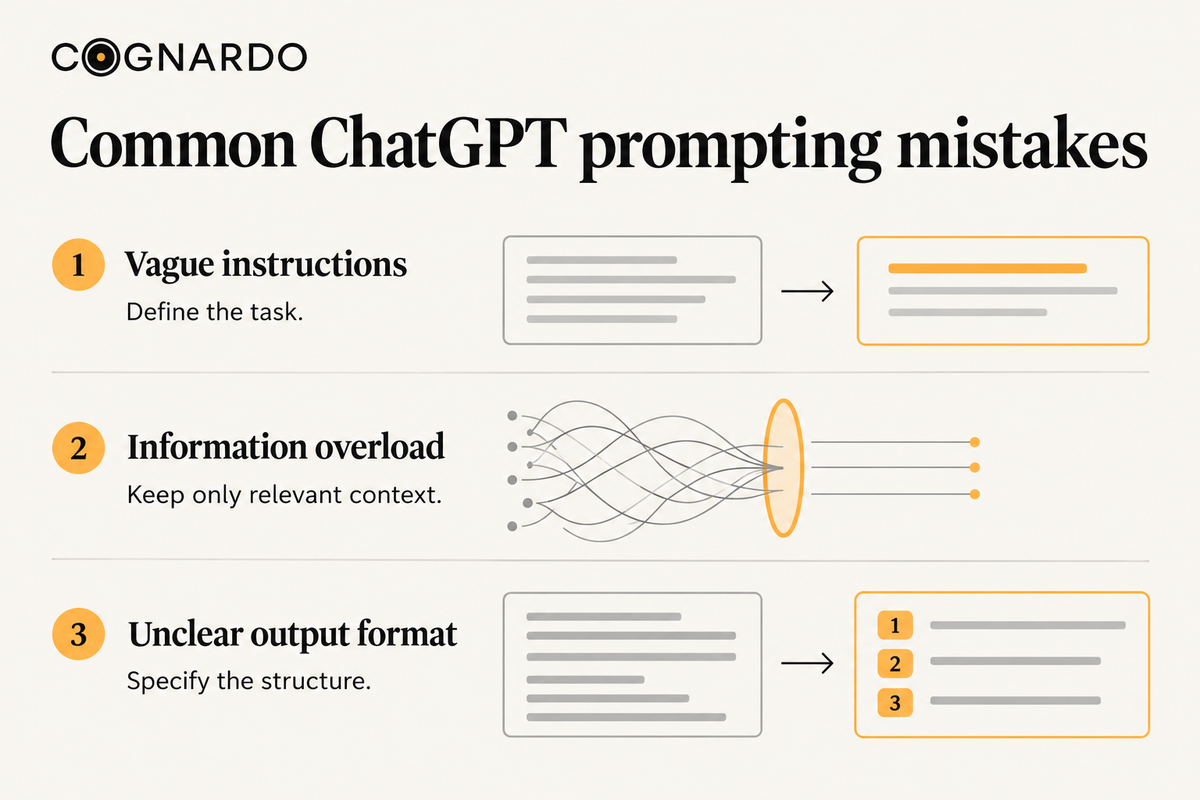
Vague Instructions
- Bad Prompt: “Write about social media marketing.”
- Good Prompt: “Write a 120-word Instagram caption with a friendly tone that encourages solopreneurs to use storytelling in their posts.”
Why it works: Specific context, audience, and format are defined.
Information Overload
- Bad Prompt: “Write a blog post about SEO, email marketing, content strategy, and social media for small agencies.”
- Good Prompt: “Write a 200-word blog intro about why SEO is essential for small agencies, using a conversational tone.”
Why it works: Breaking down tasks makes ChatGPT’s responses clearer and more usable.
Unclear Output Formats
- Bad Prompt: “Explain keyword research for beginners.”
- Good Prompt: “Explain keyword research for beginners in 5 bullet points with simple examples relevant to aspiring writers.”
Why it works: Output format (bullet points) is clearly stated.
Prompt Engineering Anti-Patterns
The “Ask and Hope” Approach
- Bad Prompt: “Help me with marketing.”
- Good Prompt: “Act as a marketing coach and suggest 3 content ideas for a solopreneur offering digital writing services.”
✅ Why it works: Role, audience, and expectations are clearly set.
Overcomplicating Simple Requests
- Bad Prompt: “Generate a 500-word blog with SEO keywords, emotional storytelling, data analysis, brand positioning, and examples for multiple industries.”
- Good Prompt: “Summarize this 600-word blog into 5 bullet points that highlight key SEO tips for small agencies.”
✅ Why it works: Simplicity gives sharper, faster results.
Excessive Jargon
- Bad Prompt: “Elaborate on the heuristics of semantic search optimization paradigms.”
- Good Prompt: “Explain semantic search in simple terms for solopreneurs who are new to SEO, using one everyday example.”
✅ Why it works: Uses plain language that aligns with the best writing style for ChatGPT prompts.
Key takeaway: If you want to master how to write prompts for ChatGPT, avoid these pitfalls. Apply clarity, simplicity, and structure, and you will see a measurable difference in output quality. ChatGPT prompt writing tips always highlight this because the best writing style for ChatGPT prompts is one that is user-friendly, clear, and context-driven.
What Tools and Resources Help Master ChatGPT Prompting?
Learning how to write prompts for ChatGPT becomes easier when you have the right tools and resources. A good ChatGPT prompt writing guide should not only explain techniques but also show you where to practice, experiment, and stay updated.
With the right platforms, extensions, and communities, you can discover ChatGPT prompt writing tips that help you consistently create the best writing style for ChatGPT prompts.
Recommended Platforms and Extensions
ChatGPT Plus and Advanced Features
- Using ChatGPT Plus gives you access to the most updated models, better context handling, and faster responses. This is especially useful if you rely on ChatGPT for content creation or SEO work.
Browser Extensions and Tools
- Extensions like AIPRM for ChatGPT or Merlin allow you to save and reuse prompts, organize them by category, and even test different variations. These tools help you build your own mini ChatGPT prompt writing guide that you can access whenever needed.
Discord Communities
Several active Discord servers help you learn prompt engineering, collaborate, and test ideas:
- Learn Prompting: 45,000+ members with a structured curriculum and expert-led discussions.
- Prompt Engineering Hub: 3,000+ members focused on advanced LLM prompting techniques.
- FlowGPT: 19,000+ members sharing effective prompts and AI discoveries.
- Stunspot Community: 9,700+ members exploring AI personas and collaborative workflows.
Reddit Communities
Reddit remains one of the largest hubs for ChatGPT prompt sharing and experimentation:
- r/ChatGPTPromptGenius: 35,000+ members sharing high-quality standardized prompts.
- r/PromptEngineering: 13,000+ members focused on feedback and advanced prompt engineering methods.
- r/ChatGPT: 1.8 million members, making it the biggest ChatGPT community worldwide.
Online Courses and Certifications
If you are serious about mastering how to write prompts for ChatGPT, formal training can accelerate your learning curve. Here are some top options:
Comprehensive University Programs
- Vanderbilt University (Coursera): “Prompt Engineering for ChatGPT” — 18 hours, fundamentals to advanced, Rating: 4.8/5 (6,400+ reviews), $59/month via Coursera Plus.
IBM Programs
- “Generative AI: Prompt Engineering Basics”: 7-hour course covering foundations.
- “IBM Generative AI Engineering”: A professional certificate program with hands-on labs, Rating: 4.8/5.
Government-Certified Programs
- Internshala Prompt Engineering Course: NSDC-certified, covers 13 AI tools.
- NIMSME Certification: 3-day intensive program covering LLMs and practical applications.
Platform-Specific & Corporate Training
- Google Prompting Essentials: Specialization in business use cases.
- Amazon Web Services: “Essentials of Prompt Engineering” for developers.
- Microsoft Learn: “Craft effective prompts for Microsoft 365 Copilot.”
Takeaway: Whether you choose online communities, specialized platforms, or certified courses, each resource brings you closer to mastering how to write prompts for ChatGPT. The more you practice and learn from others, the more you refine your personal ChatGPT prompt writing guide and adopt the best writing style for ChatGPT prompts in your work.
Why Clear Prompts Build Confident Writers
Learning how to write prompts for ChatGPT is less about tricks and more about building a habit of clear, intentional communication. Whether you are a new writer trying to gain confidence, a solopreneur working to save time while keeping your voice authentic, or a small agency owner seeking repeatable quality across a team, the same truth applies: the better your prompts, the stronger your results.
In my experience, the writers who grow fastest are the ones who treat prompt writing like any other craft; they test, refine, and pay attention to what works. That might mean starting small with a single project, like a blog outline, or building prompt libraries your team can rely on for consistency. Over time, these skills compound into sharper writing, smoother workflows, and content that feels both human and effective.
If you’re ready to go deeper, communities, tools, and structured guides can give you the clarity you need. And if you’d like step-by-step resources designed for writers and small teams, check out cognardo for detailed guides and resources. Give your AI work a intelligent, structured and organized workflow using our free chrome extension. Sign up here!
Frequently Asked Questions
Everything you need to know about the concepts discussed in this article.
Common causes include server overload, browser cache issues, network problems, or conflicting extensions. Try refreshing the page, clearing browser cache, using incognito mode, disabling extensions, or switching networks. Check status.openai.com for known outages.
ChatGPT-3.5 has 4,096 tokens (~3,000 words), ChatGPT-4 has 8,192 tokens (~6,000 words), with newer models supporting up to 128,000 tokens. Tokens include both input (your prompt) and output (ChatGPT's response). Approximately 4 characters equal 1 token.
The web interface offers a user-friendly chat experience with built-in features like file uploads and browsing. The API provides programmatic access for developers to integrate ChatGPT into applications, with pay-per-use pricing instead of monthly subscriptions.
ChatGPT Plus costs $20/month and includes priority access during peak times, faster responses, access to GPT-4 and GPT-4o models, image generation with DALL-E, voice conversations, file uploads, and custom GPT creation.
Yes, ChatGPT Plus users have a limit of 40 messages every 3 hours for GPT-4, while GPT-3.5 has higher message limits. Individual messages are limited by token counts: roughly 3,000-6,000 words depending on the model used.
ChatGPT remembers context within a single conversation thread but doesn't retain information between separate conversations unless you use the memory feature (available in Plus). Each conversation starts fresh without knowledge of previous chats.
The mobile app offers voice conversations and camera integration for image analysis, while the desktop version provides full file upload capabilities and easier typing for long prompts. Core functionality remains the same across platforms.

Raven Black
AuthorI'm Raven Black, a content strategist with a background in sales, marketing, and an MBA in IT. I simplify complex ideas into engaging, human-first content. From fintech to SaaS, I craft SEO strategies that connect. Off work, I mentor writers and brainstorm ideas that make content truly matter.
View more from Raven Black
Cognardo Workbench
A new era of prompting. Our flagship tool is designed to help you interact with large language models more effectively.
Related Guides
Explore All Guides
Practical systems for better AI-era work.
Get our latest guides, tools, and research delivered directly to your inbox. No fluff, just practical systems for creators and professionals.
Privacy guaranteed. Unsubscribe anytime.