AI-assisted lead qualification workflow: consistent, evidence-first decisions
A practical 5-stage workflow for qualifying incoming B2B service leads — rate each one against your own criteria using real evidence, let AI help extract and assess, and keep every decision with a person.
- Built for freelancers, consultants, agencies and B2B service businesses
- Works with ChatGPT, Claude, Gemini or any general-purpose AI assistant
- Fit and contact permission are checked separately, always
The idea
What is AI-assisted lead qualification?
Most small businesses qualify leads by gut feel: the enthusiastic email gets a call, the vague one gets forgotten, and the decision changes depending on the week. AI can make that worse by “reading between the lines” and inventing a budget or a decision-maker.
This workflow fixes the criteria first, then rates each lead only on what the inquiry actually says. AI speeds up the reading; the rules and the decision stay yours.
What every lead record keeps
AI extracts facts with supporting quotes, suggests ratings with a rationale, and drafts an approved message. It never approves a lead, never infers budget or authority without evidence, and never sends anything.
The workflow
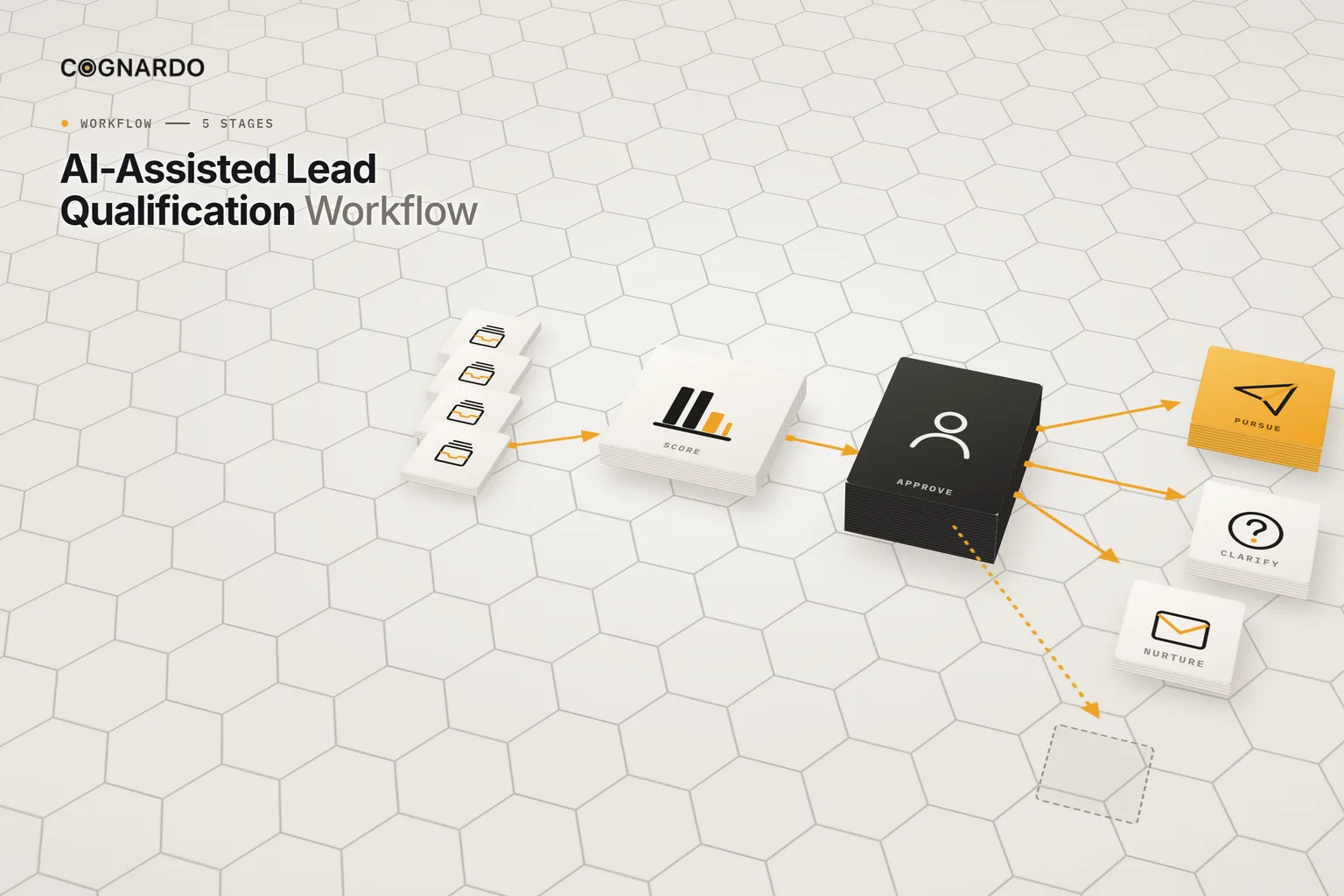
The AI-assisted lead qualification workflow.
Set the rules once. Then every inquiry goes through the same five stages, so two similar leads get the same treatment.
- 00
Set up the rules
Describe your offer, ideal client, the problems you solve and your exclusions. Review the four criteria, weights and routing bands until the rules read READY.
Output: Agreed qualification rules
Recorded in: Qualification Rules
- 01
Capture
Give each inquiry an ID and record the date, source, a summary and a link to the original evidence.
Output: A lead record tied to its evidence
Recorded in: Lead Qualification Tracker
- 02
Extract
Optionally run the extraction prompt on a sanitised copy of the inquiry. Check every fact against the original, and record what’s missing.
Output: Verified facts and open questions
Recorded in: AI Assistance → Tracker
- 03
Assess
Confirm exclusion and contact status, then enter 0, 1, 2 or Unknown for each criterion. The score and suggested route calculate.
Output: Verified ratings and a suggested route
Recorded in: Lead Qualification Tracker
- 04
Approve
Check the score and any warnings, choose the decision, and record the reviewer, the date and a reason if you override the suggestion.
Output: A human-approved disposition
Recorded in: Lead Qualification Tracker
- 05
Act
Record the next action, owner, due date and status — or a closure note. Draft a message only after approval, and only where contact is allowed.
Output: An accountable next step
Recorded in: Lead Qualification Tracker
The rules
Four weighted criteria, rated 0, 1, 2 or Unknown.
Starter weights below; you set your own. Each rating needs evidence from the inquiry or a trustworthy source.
Suggested route
Read the statuses correctly
How the score works
Weight × rating ÷ 2.
From the workbook’s first example. If any criterion is Unknown, there’s no score at all — the next step is to ask.
AI’s role
Three prompts. None of them decides.
Information extraction · After capture
Compare each fact with the original inquiry.
Assessment assistant · Before scoring
Confirm ratings and exclusions; enter them yourself.
Message drafting · After approval
Approve the wording and permission; send it yourself.
Ground rules
Four rules for qualifying leads fairly.
Unknown isn’t zero
A missing detail means ask, not mark down. A 0 is negative evidence; “Unknown” is the absence of evidence.
Don’t infer what wasn’t said
Budget, decision authority and readiness need evidence. Neither you nor the AI fills them in.
Fit isn’t permission
A perfect score doesn’t mean you may market to someone. Contact permission is checked separately.
The score supports; you decide
Exclusions override the number, and a person approves every disposition — with a reason when they disagree.
In practice
One inquiry, start to finish.
Worked example · fictional
A small distributor asks for help with a lead-nurturing email campaign
- Capture“We need support planning a lead-nurturing email campaign… launch in about 8 weeks. Our manager has approved an exploratory call; another director will sign off on any contract.”
- CheckNo exclusion. The form asked for a reply to this inquiry — permission for any other marketing is not assumed.
- ExtractService, need, an eight-week target and a decision path are found. No budget is invented; the director hasn’t approved anything yet.
- AssessService 2, Need 2, Timing 1, Ability to proceed 1 → 82.5, rounded to 83. Priority review.
- ApproveThe owner approves Pursue. No override: the suggestion matches the decision.
- ActInvite a short scoping call; ask about deliverables and contract sign-off. Owner and due date recorded.
The kit
Put the workflow into practice.
Everything above is on this page for free. The kit solves the other problem: applying the same rules to every inquiry, keeping the evidence attached, and seeing which leads still need a decision or a next step.
ai-assisted-lead-qualification-workflow.xlsx
XLSX · 5 sheets · 100 leads
Enter your email and we’ll send the workbook straight to your inbox. Free, no account, no card.
We may email you occasionally for feedback, or to tell you about new Cognardo resources. Unsubscribe any time.
Better together
Before and around qualification.
Qualification starts with an inquiry. These help you find more of the right ones and set the rules for customer data.
Before
Find the conversations
Spot people publicly describing the problems you solve, and engage only where it’s appropriate.
AI Social Listening & Lead Discovery WorkflowAround
Set the data rules
Decide what client and lead information may go into AI tools, and with which safeguards.
Small-Team AI Acceptable Use Policy TemplateRun it where you work
Keep the three qualification prompts ready.
Extraction, assessment and message drafting run on every inquiry. Workbench is our browser extension for exactly that — keep prompts organised, fill the variables in a form, and run them without leaving ChatGPT, Claude or Gemini.
FAQ
Questions, answered.
What is lead qualification?+
Deciding whether an inquiry is a good fit for what you offer, and what should happen next: pursue it, ask for more information, nurture it, or decline it. Doing it consistently means similar leads get similar treatment.
Can AI qualify leads for me?+
It can help — extracting facts from the inquiry and suggesting criterion-level ratings with reasons. It shouldn’t decide. AI can misread intent or fill gaps with assumptions, so a person verifies the ratings and approves every disposition.
What criteria should I use?+
The workbook starts with four: service fit, problem or need fit, readiness and timing, and practical ability to proceed, weighted 35/30/20/15. You edit the rubric wording and weights to match your offer.
Is the fit score a probability of closing?+
No. It’s a weighted summary of four verified ratings, used to suggest a route. It says nothing about how likely someone is to buy.
What if the inquiry doesn’t mention a timeline?+
Rate timing as Unknown, not zero. The score stays incomplete, and the right next step is to ask — exactly what the workbook’s second example shows.
Is it safe to paste lead details into ChatGPT?+
Only what’s necessary, and only if your own policies allow it. The prompts are designed for sanitised inquiries without unnecessary personal details. Check your AI provider’s data handling and your organisation’s rules.
Does it send follow-up emails?+
No. A prompt can draft a message for an approved action, but you review it, confirm contact is permitted, and send it yourself.