AI content creation workflow: from brief to publish-ready
A practical 7-stage workflow for creating content with AI — decide what the piece must do first, let AI draft in controlled steps, then review, verify and hand off a finished asset.
- Works with ChatGPT, Claude, Gemini or any general-purpose AI workspace
- Built for articles, newsletters, scripts, case studies, landing pages and social content
- Separates generation from editorial judgement, with a real finish line
The idea
What is an AI content creation workflow?
It isn’t: type a topic, get a draft, tweak it until it sounds fine. That gives you fluent copy built on the model’s guesses about your audience, angle and facts — and no way to tell which is which.
A workflow separates the decisions from the drafting. Each stage produces one approved output that the next stage builds on.
What each stage hands to the next
AI drafts, revises and polishes to explicit instructions. People set the objective, approve the sources, choose the angle, make the editorial calls and approve the final asset.
The workflow
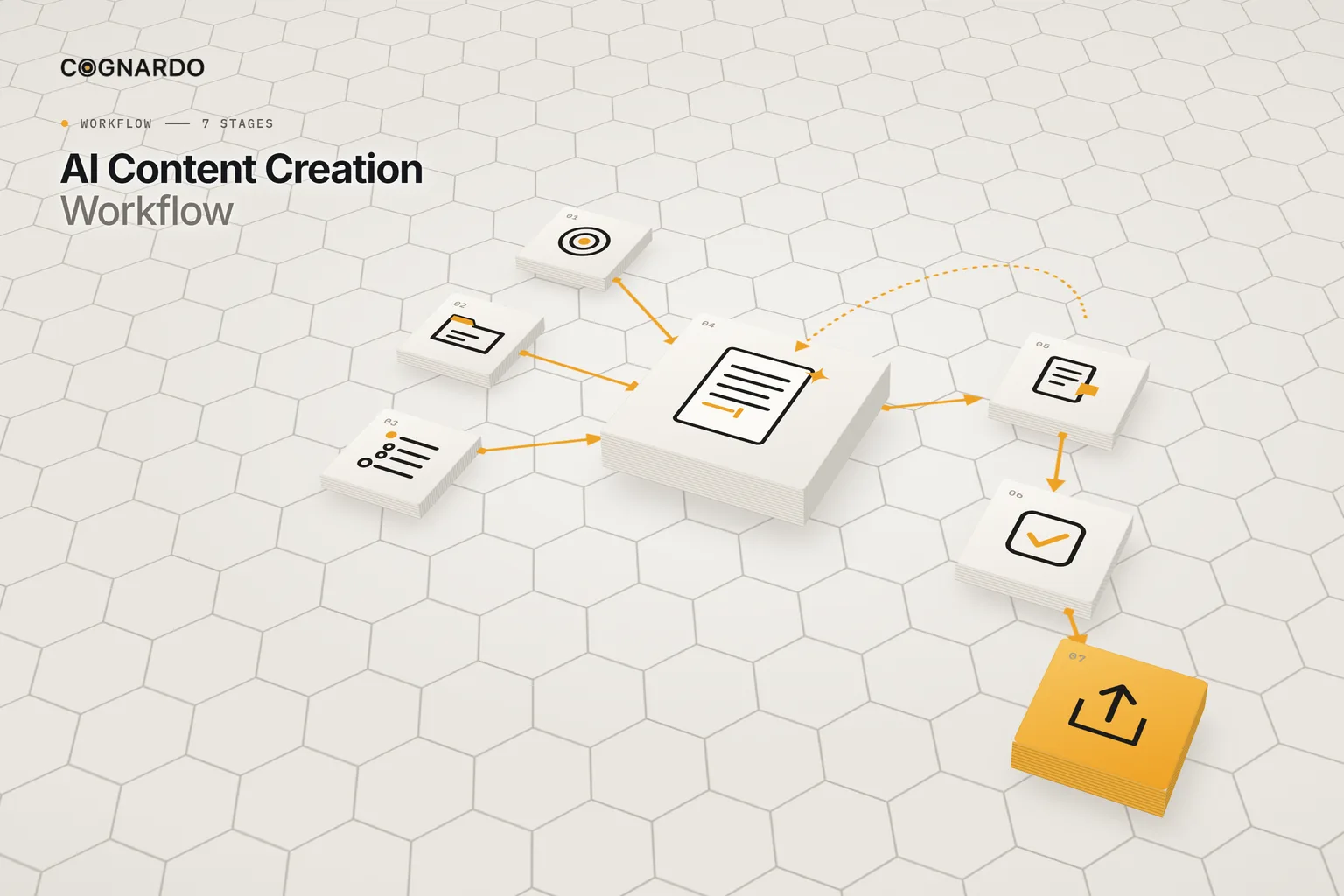
The 7-stage AI content creation workflow.
Three stages of decisions, one of drafting, three of judgement and release. Drafting is the shortest part on purpose.
- 01
Setup
Define the assignment before asking AI for anything: topic, content type, audience and their need, the objective, the reader outcome, the core message, the CTA, the channel and the constraints.
Output: Approved content creation brief
Recorded in: Content Setup
- 02
Context
Register the internal knowledge, sources, examples and constraints AI may use, mark each one approved or not, and summarise only what should carry forward.
Output: AI-ready context package
Recorded in: Source & Context
- 03
Plan
Decide the angle, the central promise, the supporting points and what to avoid, then approve an outline specific enough that drafting doesn’t have to rediscover the strategy.
Output: Approved content plan and outline
Recorded in: Content Plan
- 04
Create
Run AI in controlled tasks from the approved inputs: check readiness, refine the outline if needed, draft, revise to instructions, polish. Never “make it better” on repeat.
Output: Working, then revised, draft
Recorded in: AI Creation
- 05
Review
Apply editorial judgement across nine areas, decide what should change and what should stay, and write the revision instructions. Some passages are better rewritten by a person.
Output: Approved revision direction
Recorded in: Human Review
- 06
Verify
Check accuracy, objective, editorial quality, brand judgement and production readiness, then decide: Ready, Needs Revision or Blocked.
Output: Ready / Needs Revision / Blocked decision
Recorded in: Verification & Final QA
- 07
Hand off
Record the approved title, the final location, the approver and the next production action. The work isn’t done until the asset can be found and handed off.
Output: Publish-ready content package
Recorded in: Final Output & Handoff
AI’s role
Five AI tasks. Run only the ones you need.
Each task is a copy-ready prompt that pulls in your approved brief, context and outline. None of them is “make it better”.
Task A
Context readiness
Finds missing information before any drafting begins.
Run: After setup, context and the core plan are done
Task B
Outline refinement
Adds detail to the approved outline without changing the strategy.
Run: Only if the outline isn’t detailed enough to draft from
Task C
First draft
Produces the first substantial version from approved inputs only.
Run: Once the brief, context and outline are approved
Task D
Targeted revision
Applies the human review instructions, and nothing else.
Run: After Human Review has written the instructions
Task E
Final polish
Improves clarity, flow and formatting without changing substance.
Run: After substantive revision, before final QA
Human judgement
Review decides. AI revises.
Nine review areas turn “something’s off” into specific editorial decisions. Those become the only instructions AI revises to.
Final QA · 15 checks
Every check is Pass, Needs Revision, Blocked or not applicable. One Blocked check blocks the asset.
Accuracy
- Material claims checked
- Sources represented without distortion
- No invented facts or open [VERIFY] markers
- Names, dates, figures and quotes checked
Objective
- Fulfils the objective
- Meets the audience need
- CTA follows logically
Editorial quality
- Clear, coherent, useful
- Depth fits the format
- Filler and generic AI language removed
Brand & judgement
- Tone fits the business
- No overstated certainty
- Review nuance preserved
Production
- Links and assets in place
- Title, destination and owner clear
Decision
Ready · Needs Revision · Blocked
The recommendation is a rule. The final call is yours.
Ground rules
Four rules for better AI content.
Brief before prompt
A one-line prompt makes AI guess the audience, angle and purpose. Decide them first, and drafting becomes execution rather than invention.
Only approved context
AI works from the sources and facts you approved, not from whatever it remembers. Anything that needs verifying is flagged, not smoothed over.
Review before you revise
Repeated “make it better” prompts drift. Decide what should change, write it down, then ask AI to apply exactly that.
Done means handed off
A draft in a chat window isn’t finished. The work is complete when it is verified, approved, located and handed to whoever publishes it.
In practice
One article, all the way through.
Fictional assignment · Northstar Studio
“How to Prepare for a Website Redesign Kickoff”
- SetupA practical article for small-business owners preparing for a redesign. Objective: help readers arrive at the kickoff better prepared. CTA: use the kickoff-preparation checklist.
- ContextAn internal kickoff checklist and notes from discovery calls, both approved, but as process context and audience language, not as statistics.
- PlanAngle: preparation matters more than design vocabulary. Must avoid implying the client needs a finished design solution.
- CreateA readiness check flags gaps, then a first draft is written only from the approved brief, context and outline.
- ReviewNine areas reviewed; revision instructions written as decisions: what changes, what stays, and the boundaries.
- VerifyFifteen checks, from claims and sources to CTA and final destination, ending in a Ready decision.
- Hand offApproved title, final location and next publishing action recorded. The workflow reads Complete.
The kit
Put the workflow into practice.
Everything above is on this page for free. The kit solves the other problem: running each piece through the same stages without losing the brief in one chat, the sources in another and the approvals in your head.
ai-content-creation-workflow.xlsx
XLSX · 8 sheets · 7 stages
Enter your email and we’ll send the workbook straight to your inbox. Free, no account, no card.
We may email you occasionally for feedback, or to tell you about new Cognardo resources. Unsubscribe any time.
Better together
Go deeper at either end.
The workflow covers the whole journey. Two companion resources go further on the stages that matter most for high-stakes pieces.
Before drafting
A fuller brief
When the assignment needs more than Content Setup holds — search context, approved sources, guardrails and a copy-ready brief.
AI Content Brief TemplateBefore publishing
Deeper verification
For research-heavy or high-risk content — claim-by-claim checks, citations, reasoning and a documented release decision.
AI Output Verification ChecklistRun it where you write
Keep the five creation tasks one click away.
The same readiness, drafting, revision and polish prompts run on every piece. Workbench is our browser extension for exactly that — keep your prompts organised, fill the variables in a form, and run them without leaving ChatGPT, Claude or Gemini.
FAQ
Questions, answered.
What is an AI content creation workflow?+
A staged process for producing content with AI where each stage has one job and one output: a brief, an approved context package, an approved outline, a draft, revision direction, a QA decision and a handoff. AI does the drafting work; people make the editorial decisions and own approval.
Can I just ask ChatGPT to write a blog post?+
You can, and you will get something fluent. What you won’t control is the audience, angle, claims or structure: the model fills those in with the most common version of the topic. The workflow front-loads those decisions so the draft reflects your thinking, not the average.
How do I stop AI from inventing facts in my content?+
Give it an approved context package and tell it to use only that. Mark anything that needs checking, and run a verification stage before anything is published. The QA sheet checks claims, sources, names, dates, figures and quotations specifically.
Why separate human review from AI revision?+
Because “make it better” is not an instruction. Reviewing first, then writing explicit revision decisions, keeps the strategy and approved facts stable. Asking AI to improve a draft repeatedly tends to drift away from both.
Do I need every stage for every piece?+
Every stage, yes, but not every AI task. The outline refinement and targeted revision tasks are run only when needed. For short or low-stakes pieces, each stage can be brief, but the brief, the review and the final check still matter.
How is this different from the AI Content Brief Template?+
The brief template goes deep on one thing: the brief. This workflow takes you from brief to published asset, through context, planning, drafting, review, verification and handoff. If you already have a full brief, reference it and copy only the minimum inputs into Content Setup.
Which AI tool should I use?+
Any capable general-purpose AI workspace: ChatGPT, Claude, Gemini or similar. The prompts are tool-neutral, and the workbook doesn’t depend on any particular product feature.