AI content review & approval workflow: from draft to release
A practical 8-stage workflow for reviewing content with AI assistance — judge it against a brief, track every issue to a verified fix, and record an explicit, human, version-specific approval.
- Works with ChatGPT, Claude, Gemini or any general-purpose AI tool
- Built for articles, landing pages, newsletters, guides, lead magnets and client documents
- Solo creators can use it too: you switch roles consciously instead of skipping them
The idea
What is a content review and approval workflow?
Most content “review” is a read-through and a thumbs up. Nobody recorded what it was checked against, which issues were found, whether they were fixed, or which version was actually approved.
A review workflow makes each of those visible: a standard to review against, findings that become owned issues, fixes that get re-checked, and a release decision tied to one version.
What has to stay connected
AI can surface candidate issues quickly and compare a revision with the original problem. It never approves. Only an explicit human decision, recorded against a version, makes content Approved.
The workflow
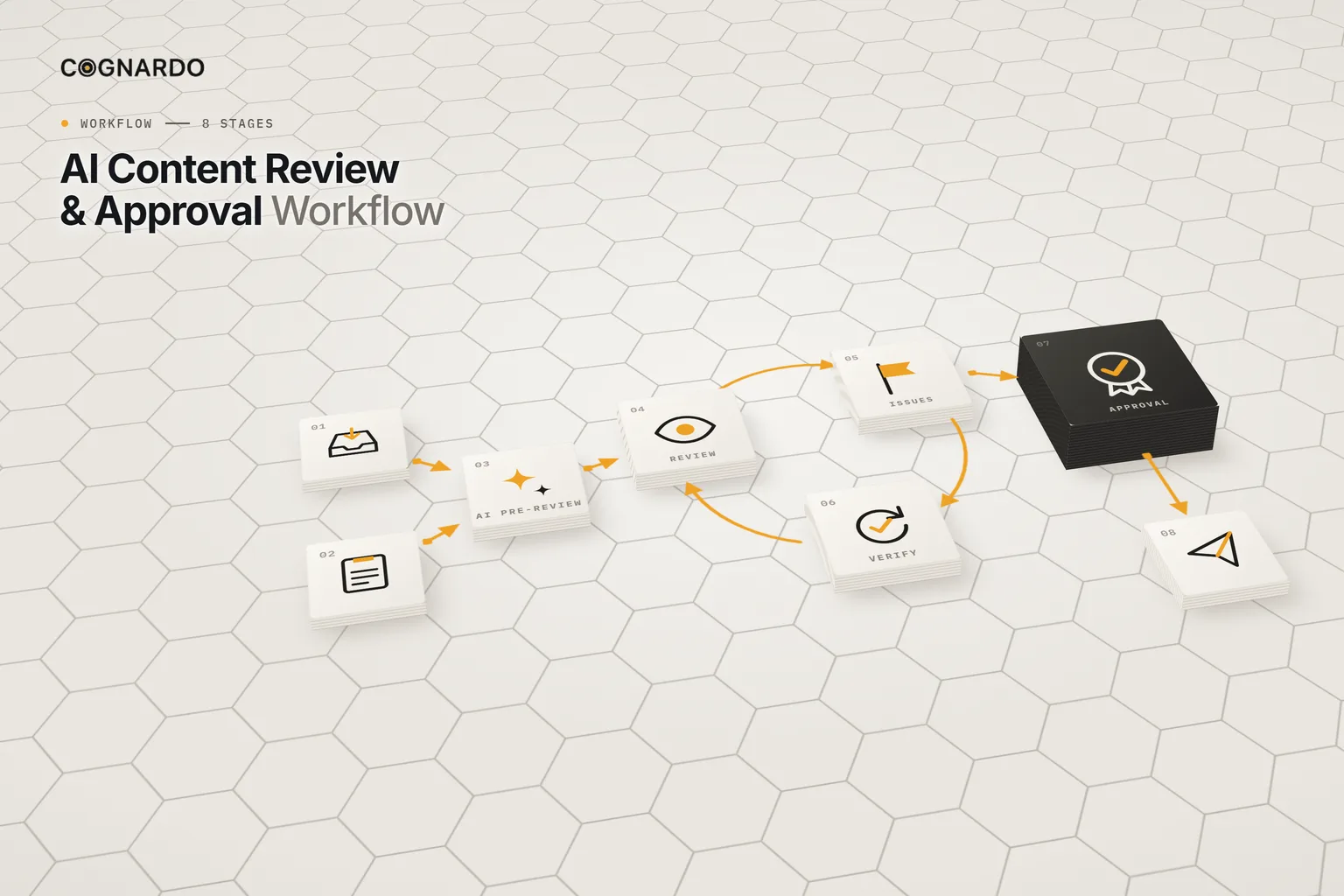
The 8-stage review & approval workflow.
Review, issues and verification form a loop that repeats until nothing blocking remains. Approval sits outside the loop on purpose.
- 01
Register
Add the content to the review queue with an ID, version, owner, reviewer, approver and due date. Only substantially complete content enters formal review.
Output: A tracked content item
Recorded in: Review Queue
- 02
Brief
Define what good looks like: objective, audience, destination, desired action, key message, required points, sources of truth and claims that need special checking.
Output: A clear review standard
Recorded in: Review Brief
- 03
AI pre-review
Run the structured pre-review prompt against the brief to surface likely problems quickly. Every finding is a candidate until a person validates it.
Output: Candidate findings
Recorded in: AI Review Prompts
- 04
Human review
Assess the content against ten criteria. Validate or reject AI findings, add what AI missed, and set a result and severity for each.
Output: A human-reviewed assessment
Recorded in: Review Workspace
- 05
Issues & revision
Turn validated findings into issues: one row each, with a severity, the required change and an owner. Then revise the source content.
Output: Trackable revision actions
Recorded in: Issues & Revisions
- 06
Verification
Re-check each issue against the revised version: resolved, partially resolved, not resolved or unable to verify. Unresolved issues go back round.
Output: Verified issue status
Recorded in: Issues & Revisions
- 07
Approval
The approver records an explicit decision for the version reviewed: Approved, Changes Required, Rejected or On Hold, with open blocking issues counted.
Output: A version-specific approval record
Recorded in: Approval Log
- 08
Release
Publish or hand off exactly the version that was approved. Material edits after approval start a new review cycle.
Output: Released content
Recorded in: Review Queue
What gets checked
Ten criteria, every review.
Each criterion gets one result and, if something’s wrong, a severity. AI’s candidate finding sits beside your judgement, not in place of it.
Result
The decision
Four outcomes. One of them is Approved.
No “approved with changes”. Every attempt is its own row, tied to the version reviewed and the number of blocking issues still open.
Approved
This version is release-ready.
Changes Required
Back to revision, then another review cycle.
Rejected
Not going out in this form.
On Hold
Paused, with the reason recorded.
AI’s role
AI assists the review. It never signs off.
Structured pre-review
Before human review: surfaces candidate findings against the brief.
Claim & verification review
Lists claims that need checking, without fact-checking from memory.
Revision verification
After revisions: checks whether each logged issue now looks resolved.
Final readiness summary
Just before approval: summarises status for the approver. Never decides.
Ground rules
Six rules that keep approval meaningful.
Blocking means blocking
Don’t approve while a blocking issue is open. Resolve it, or record a deliberate, owned decision to accept the risk.
AI findings are candidates
AI misses real problems and flags non-problems. A person validates each finding before it becomes an issue.
Approval applies to a version
Content changes after review. Record the version approved; material edits mean a new cycle.
Review isn’t approval
Finishing a review doesn’t authorise release. Only an explicit decision in the Approval Log does.
Not applicable is valid
Not every criterion fits every piece. Mark it N/A instead of forcing an irrelevant check.
Accepted risk needs an owner
Occasionally a known issue is accepted. Write down why, and make sure a named person owns that decision.
In practice
One article, two review cycles.
Worked example · EX-001
“Choosing a CRM for a Small Service Business”
- BriefObjective: help a small service-business owner evaluate CRM options. Constraint: avoid guarantees; give a practical next step.
- Review v1.0Audience fit passes. Accuracy finds “This CRM eliminates all manual follow-up” — a guaranteed outcome with no support.
- IssueLogged as Blocking, in the “Why CRM matters” section. Required change: qualified wording tied to configuration and workflow.
- Verify v1.1Now reads that a CRM “can reduce repetitive follow-up work when configured for the business process.” Resolved.
- ApproveThe approver records Approved against v1.1, with zero open blocking issues. v1.1 is what gets published.
The kit
Put the workflow into practice.
Everything above is on this page for free. The kit solves the other problem: keeping review notes, issue lists, revisions and approvals connected to the right content and the right version.
ai-content-review-approval-workflow.xlsx
XLSX · 7 sheets · 8 stages
Enter your email and we’ll send the workbook straight to your inbox. Free, no account, no card.
We may email you occasionally for feedback, or to tell you about new Cognardo resources. Unsubscribe any time.
Better together
Before review, and for higher stakes.
This workflow starts with finished content. Two companions cover the step before and the deeper checks some pieces need.
Before review
Create the content
Take a piece from brief to a reviewed draft, with approved context and controlled AI drafting.
AI Content Creation WorkflowHigher stakes
Verify claim by claim
For research-heavy or high-risk content: claims, citations, reasoning and a documented release decision.
AI Output Verification ChecklistRun it where you review
Keep the four review prompts one click away.
Pre-review, claim checks and revision verification run on every piece. Workbench is our browser extension for exactly that — keep prompts organised, fill the variables in a form, and run them without leaving ChatGPT, Claude or Gemini.
FAQ
Questions, answered.
What is a content approval workflow?+
A defined path from finished draft to release: review against a standard, track issues to verified fixes, and record an explicit decision about a specific version. It turns “looks fine to me” into something you can check later.
Can AI approve content?+
No. AI can surface candidate issues, list claims that need checking and summarise readiness, but it can miss problems and invent non-problems. Only a person can record Approved, and the workbook keeps that decision separate from the AI output.
What counts as a blocking issue?+
Anything that should stop release: an unsupported guarantee, a factual error, missing required information, a legal or reputational risk. Blocking issues must be resolved, or deliberately accepted with a recorded reason and an owner, before approval.
Why record the version that was approved?+
Because content keeps changing after review. Approving “the article” is ambiguous; approving v1.1 isn’t. If material edits are made later, they trigger a new review and approval cycle.
I work alone. Is this overkill?+
You can play every role. The point is to switch roles consciously: review against the brief as a reviewer, then decide as the approver. That separation catches more than a single read-through.
What should the review be checked against?+
The review brief: the content’s objective, audience, destination, desired action, key message, required points, source materials and special constraints. Without it, feedback drifts into personal preference.
How is this different from the AI Output Verification Checklist?+
This workflow reviews all aspects of a piece and manages the approval process. The verification checklist goes deep on one aspect — whether AI-assisted claims, citations and reasoning hold up — for high-stakes work.