AI automation discovery & design workflow: find it, then design it properly
A practical 8-stage workflow for deciding which work is worth automating and turning one candidate into an implementation-ready design brief — with AI, rules and people each assigned deliberately.
- Two routes in: “I don’t know what to automate” or “I already have an idea”
- Tool-neutral: it designs the automation, it doesn’t pick a platform
- Ends with a design brief you can hand to whoever builds it
The idea
What is automation discovery and design?
Most automation projects start with a tool and an idea, and skip the questions that decide whether they work: is this process stable, what are the exceptions, what should stay human, and what happens when it fails.
Discovery finds candidates in real recurring work and screens out the poor ones. Design then maps the actual process, assigns each step on purpose, plans for failure and proves it on a small pilot first.
From friction to handoff
AI can help spot candidates, rate suitability, structure a process description, draft a target design and stress-test it. You own the process truth, business rules, risk, permissions, approvals and the final readiness decision.
The workflow
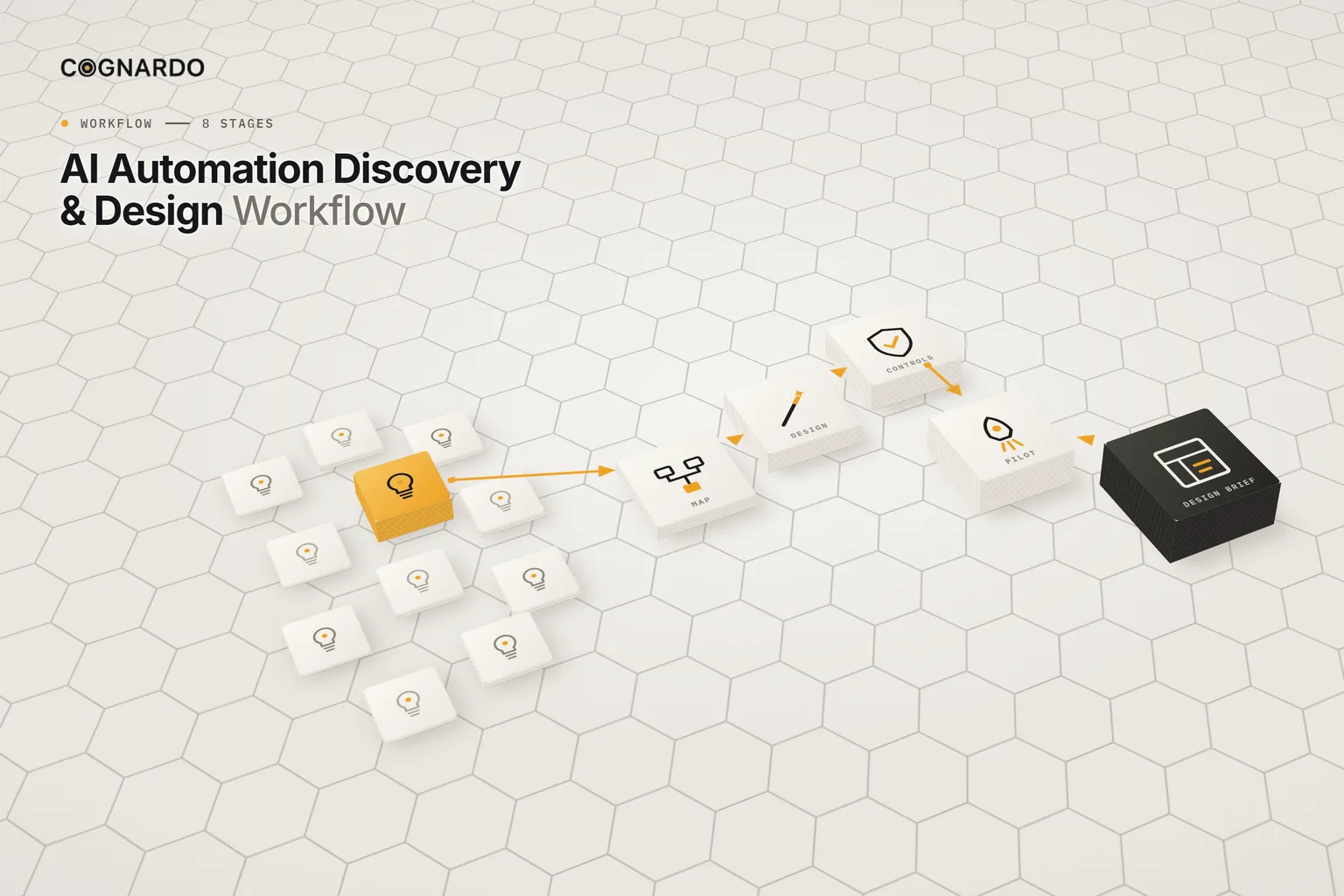
The 8-stage automation discovery & design workflow.
Discovery is wide; design is deep. Exactly one candidate crosses from one to the other.
- 01
Discover
Capture candidates from real recurring work: the trigger, current method, frequency, friction and the improvement you want. No solutions yet.
Output: A list of real candidates
Recorded in: 2 Discover Opportunities
- 02
Screen & prioritise
Rate suitability on ten dimensions and priority on seven. Then select exactly one candidate — deliberately, not just the top score.
Output: One selected automation
Recorded in: 3 Screen & Prioritize
- 03
Map the current process
Document how the work actually happens today: start and end boundaries, each step, its owner, inputs, decisions, handoffs and pain points.
Output: A verified current-state map
Recorded in: 4 Map Current Process
- 04
Design the automation
Simplify first, then assign each future step to deterministic automation, AI, a person, or removal — with triggers, rules, checkpoints and outputs.
Output: A target-state workflow
Recorded in: 5 Design Automation
- 05
Controls & exceptions
Design for failure, not just the happy path: likelihood, impact, detection, prevention, recovery, escalation and an owner for each material issue.
Output: A controls and exceptions register
Recorded in: 6 Controls & Exceptions
- 06
Pilot & readiness
Define the smallest useful pilot, the measures and the stop criteria, check ten readiness criteria, and record a human readiness decision.
Output: A pilot plan and readiness decision
Recorded in: 7 Pilot & Readiness
- 07
Design brief
Review the auto-assembled brief: objective, scope, trigger, inputs, the future workflow, responsibilities, controls, pilot and readiness.
Output: An implementation-ready design brief
Recorded in: 8 Automation Design Brief
The screen
Is it suitable? Ten questions first.
Each rated 1–5. The score supports the selection; it doesn’t make it.
Then priority
Is it worth it? Seven more.
Complexity and risk count in reverse, so a simpler, safer candidate rises. Then you mark exactly one as Selected.
Don’t select a candidate purely because it scored highest. Candidates that need clarification should usually be clarified before deeper design.
The important part
Every step gets one responsibility.
Simplify first. Then decide, step by step, who or what does the work.
Deterministic automation
Explicit rules, same input → same result.
AI-assisted task
Language or judgement-like work, with its instruction written down.
Human task / decision
Approvals, judgement and anything accountable.
Removed / not required
The simplest automation is a step that no longer exists.
Controls & exceptions
Design for when it goes wrong.
Review each category; record only the material issues, with detection, prevention, recovery, escalation and an owner.
Readiness
Ten checks before a pilot.
- The objective is clear
- The process boundary is clear
- The current workflow is verified
- A trigger and completion state exist
- Inputs are known
- Target steps are defined
- Human responsibilities are known
- Systems and dependencies are identified
- Exceptions have responses
- Success can be measured
The signal reads Ready to pilot, Needs design work, or Do not proceed yet. Your recorded decision is what counts.
Ground rules
Four rules for automation that survives contact with reality.
Don’t automate an unstable process
A low rating for process stability or risk control blocks “Good candidate”, however high the average.
Map before you design
Design from how the work actually happens, verified by people who do it — not from how it’s supposed to happen.
Use rules before AI
If a step can be a deterministic rule, make it one. AI is for the steps that genuinely need it, with written instructions.
Pilot small, with stop criteria
Decide what would make you stop before you start. Readiness is a human decision, not a formula.
In practice
What the brief contains.
The output
One reviewed Automation Design Brief
- PurposeThe automation’s name, business objective and the problem it solves.
- ScopeStart and end boundaries, trigger, required inputs, systems and data dependencies, final output and completion state.
- ResponsibilitiesHow many steps are deterministic automation, AI-assisted and human, with each step’s rules and checkpoints.
- ControlsEvery recorded failure mode and exception, with its risk score, detection, response and status.
- PilotScope, owner, test cases, what stays manual, volume, review point, stop and success criteria.
- DecisionThe system readiness signal, your readiness decision and the recommended next action.
The kit
Put the workflow into practice.
Everything above is on this page for free. The kit solves the other problem: carrying one candidate from a list of ideas to a reviewed design brief, with every decision recorded along the way.
ai-automation-discovery-design-workflow.xlsx
XLSX · 8 sheets · 8 stages
Enter your email and we’ll send the workbook straight to your inbox. Free, no account, no card.
We may email you occasionally for feedback, or to tell you about new Cognardo resources. Unsubscribe any time.
Better together
Wider view, or a quicker plan.
This workflow goes deep on one automation. Two companions work at different levels.
Wider
Prioritise AI use cases
Compare many AI opportunities on value, feasibility and risk before picking which to pursue.
AI Use-Case Prioritization MatrixLighter
Plan one automation on a canvas
A shorter five-sheet plan when you already know the process and need a clear handoff.
AI Automation Planning CanvasRun it where you work
Keep the design prompts ready for the next candidate.
Discovery, screening, mapping and stress-testing prompts get reused on every automation you consider. Workbench is our browser extension for exactly that — keep prompts organised, fill the variables in a form, and run them without leaving ChatGPT, Claude or Gemini.
FAQ
Questions, answered.
How do I find what to automate in my business?+
Look at recurring work: repetitive actions, copying between systems, intake and routing, standard documents, routine follow-up, recurring checks and predictable handoffs. Capture them lightly first, with the trigger, frequency and friction, then screen them before designing anything.
Should I use AI or simple automation?+
Use deterministic rules wherever the right action can be written down explicitly; they’re cheaper and more predictable. Use AI for steps involving language or judgement-like work, with written instructions and a human checkpoint where the stakes call for one.
What makes a process unsuitable for automation?+
Instability and uncontrolled risk above all. The screen rates ten dimensions, and a low score for process stability or risk control prevents a “Good candidate” result regardless of the average.
Why map the current process first?+
Because automation built on an assumed process breaks on the real one. Mapping exposes the hidden steps, decisions, handoffs and exceptions — and often reveals steps to remove rather than automate.
Does this pick an automation tool for me?+
No. It designs what the automation should do, independent of platform. The design brief is what you give to whoever builds it, in whichever tool you choose.
How is this different from the AI Automation Planning Canvas?+
The canvas is a lighter, five-sheet plan for one automation you’ve already chosen. This workflow adds discovery and screening across many candidates, a full current-state map, a detailed controls register and a consolidated design brief.
When is a design ready to build?+
When the readiness checks pass and a person decides it is. The workbook gives a system signal — Ready to pilot, Needs design work, or Do not proceed yet — but the recorded decision is yours.